Whether you’re gaming, editing videos or running complex simulations, every component inside your PC generates heat. If that heat isn’t managed properly, it can lead to performance issues or even long-term damage to your hardware. CPUs and GPUs will throttle themselves when they get too hot, which means slower speeds and less consistent performance.
Good cooling isn’t just about keeping things quiet; it’s about protecting your investment. A well-cooled PC runs faster, lasts longer and stays stable even under heavy loads. For gamers, creators and professionals alike, managing heat is just as important as choosing the right hardware.
Understanding the Basics of PC Cooling
When it comes to cooling, there are two main methods: air cooling and liquid cooling.
Air cooling is the most common approach. It relies on fans and heatsinks to move heat away from PC components and out of the case. It's simple, dependable and works for most users when starting out. Liquid cooling uses a pump to circulate coolants through tubes and radiators, transferring heat more efficiently. It can offer impressive results, but is also more costly, requires more setup and maintenance.
For those just starting out, this article will focus on air cooling. Liquid cooling can be a great choice later, but beginners will get excellent results from air cooling setups when done right.
Cooling can also be active or passive. Active systems use moving parts like fans or pumps, while passive systems rely on heatsinks and ambient airflow. Our passive cooling cases are designed for fanless, silent operation and are commonly used in embedded and industrial applications, where reliability and minimal maintenance are key.
Cooling the CPU
Your CPU is the heart of your system and considered the most important component in a PC. Without proper cooling, it can quickly overheat, throttle performance and shut down your system to protect itself.
For powerful gaming rigs or high-performance workstations, tower coolers are often the go-to option thanks to their large heatsinks and strong airflow via cooling fans that dissipate a lot of the heat generated by the CPU. Small systems like home theatre PCs or compact desktops benefit from low-profile coolers, which offer efficient heat dissipation while fitting in tight spaces.
When choosing a cooler, one of the most important things to look for is its Thermal Design Power (TDP), measured in watts. TDP refers to "the power consumption under the maximum theoretical load". In practice, this is a measure of the maximum heat a computer chip (e.g., CPU or GPU) is expected to generate and, subsequently, indicates how much heat a cooler can effectively handle. The higher the TDP, the more thermal capacity the cooler has, which is especially important for high-performance CPUs and overclocking. Matching or exceeding your cooler’s TDP to the CPU’s TDP ensures you achieve stable temperatures and consistent performance in your PC.
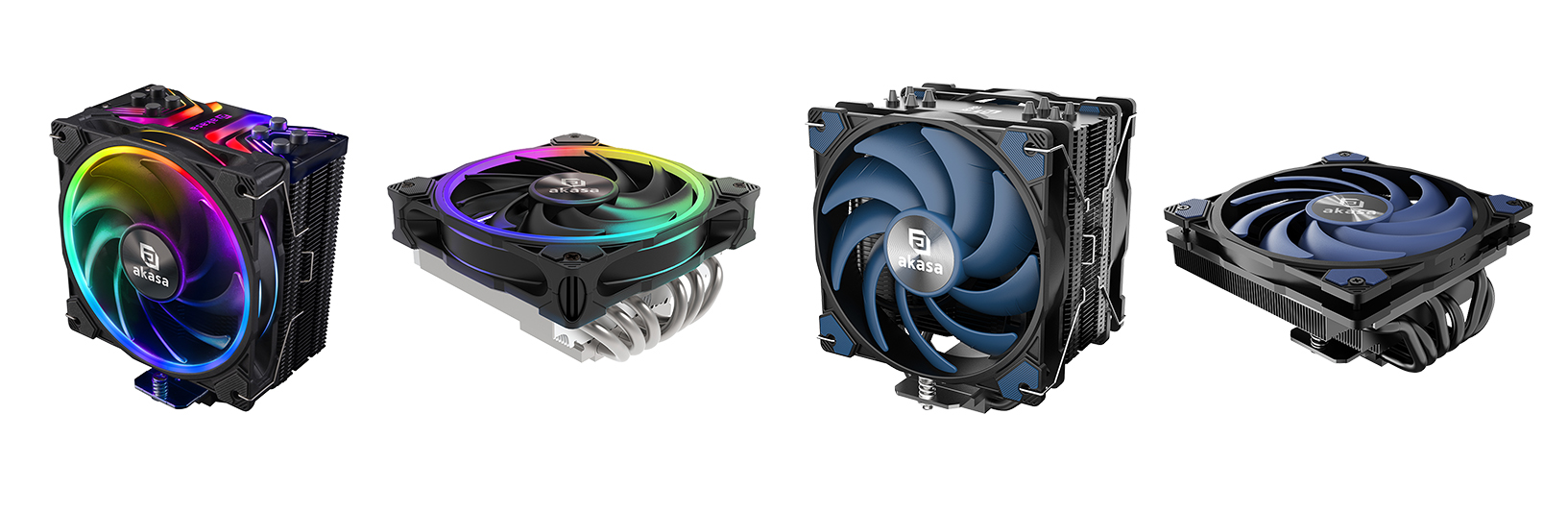
CPU coolers come in diverse shapes and sizes, designed for all types of PC builds: from overclocked gaming rigs, reliable workstations, to small form-factor (SFF) PCs. For gamers who want vibrant aRGB lighting with strong performance, the SOHO Series, featuring the SOHO H4 Plus and SOHO H6L (low-profile), is a perfect fit. If you're looking for quiet, reliable and affordable cooling for everyday use, the Alucia Series, including the Alucia H4 Plus and Alucia H6LS M2 (low-profile) delivers efficient performance with minimal noise. If you're building a SFF PC and limited on space, our "mini but mighty" low-profile coolers pack excellent cooling performance in a compact size, coming in photic blue (Alucia H4i/A) or flashy aRGB (Vegas Chroma iLG) to suit any aesthetic.
Case Airflow
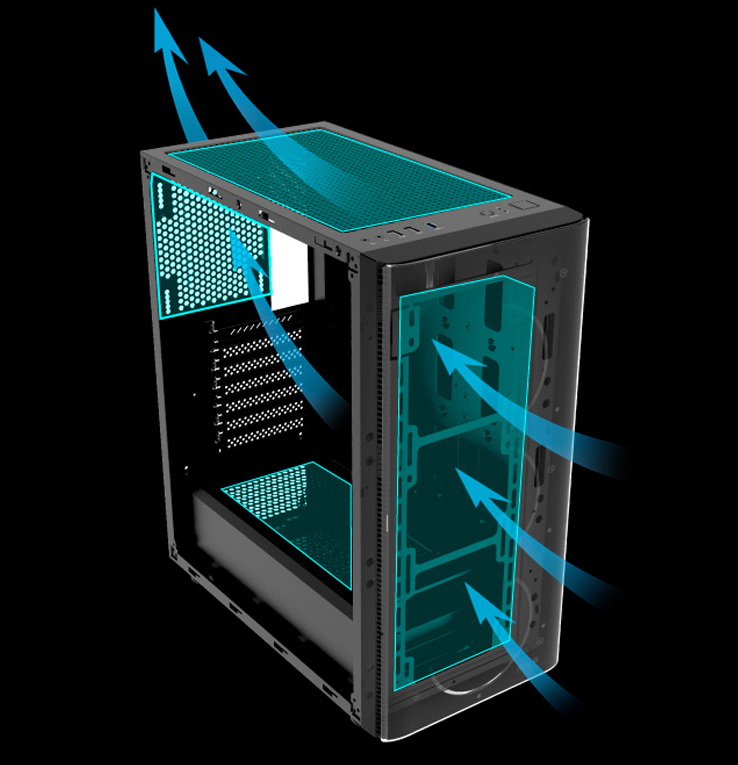
Case airflow is the pre-eminent driver for how well a PC can manage heat. Think of it as a wind tunnel, directing currents of air through the system.
Intake fans pull cool air into the case, usually from the front or bottom, while exhaust fans push warm air out through the back or top. When balanced correctly, airflow helps every component stay cooler and function efficiently.
It also helps to understand how positive and negative pressure can affect case airflow. When fans pull in more air than they push out, the result is positive pressure. When fans are pushing out more air than they pull in, it becomes negative pressure. Dust can also accumulate inside the case through holes and small gaps if a system has negative pressure, which means frequent cleaning of the case is required to keep the system running efficiently.
The best approach is to aim for a balanced setup, with a slight lean toward positive pressure to best prevent dust accumulation. Finding a balanced setup that suits your PC will depend on adjusting fan placement and direction.
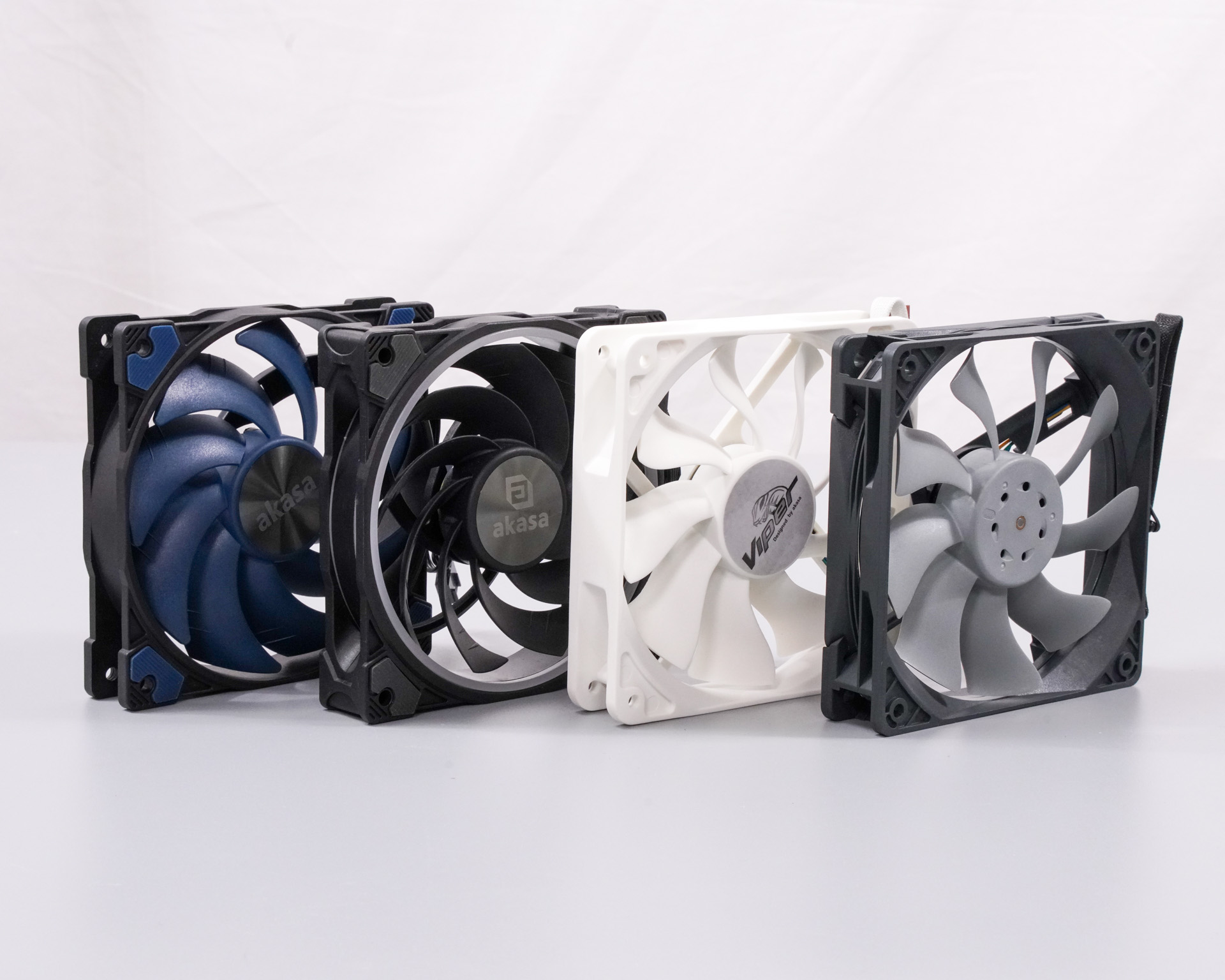
Choosing the right fans can make a difference depending on your specific needs for your build. Just like coolers, fans also come in various types, styles and sizes: airflow fans, static pressure fans, shiny aRGB fans, and even waterproof or dustproof fans.
Airflow fans are designed to move as much air through a case as possible. When measuring a fan’s performance, cubic feet per minute (CFM) is used as the metric to measure the amount of air that can be moved through your case in one minute. Typically, a higher CFM means more air is moving and performs better for cooling.
Static pressure fans differ slightly than standard airflow fans because they’re built to push air through tight spaces like heatsinks or radiators. They usually have a lower CFM than standard airflow fans but maintain stronger focused airflow, making them perfect for CPU coolers.
Whatever the build, Akasa has a range of fans to suit your needs:
- Alucia - designed for silent cooling performance
- SOHO - designed for gamers in mind, perfect for vibrant aRGB cooling
- Viper - designed for focused centralised airflow from our S-FLOW fan blades
- Otto - designed for heavy duty applications with IP68 rated rotor that can withstand dirt, dust, sand and water
Thermal Interface Material (TIM)
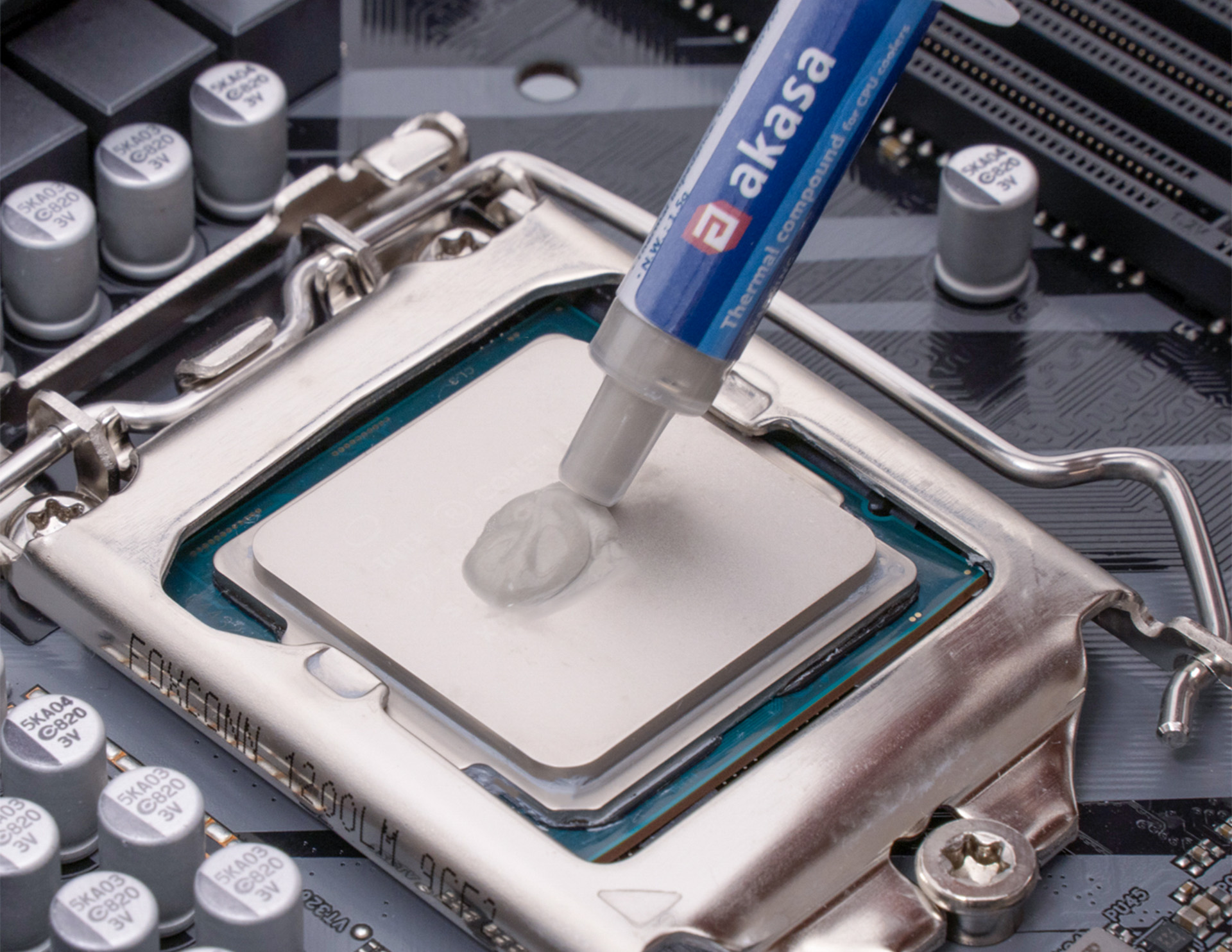
Between the CPU and cooler is a small but critical layer called thermal interface material (TIM). The surfaces of both the CPU and the cooler, while appearing smooth, have microscopic irregularities, leaving tiny air gaps when you place the two together. TIM fills these gaps to eliminate trapped air and ensures heat transfers efficiently from the CPU to the cooler’s heatsink.
TIM comes in various forms, most commonly thermal compound and thermal pads. Both act as thermally conductive bridges between a component (such as a CPU) and its cooler, but each has distinct characteristics suited to different applications.
Thermal compound is a viscous material that spreads to fill microscopic surface imperfections, offering excellent heat transfer by effectively forming a coating over the surface between components. As such, it’s commonly used between CPUs and CPU coolers due to its high thermal conductivity, where efficient heat dissipation is crucial. However, it requires careful application and cleanup to ensure the surface is fully covered without spilling onto surrounding components.
Thermal pads, by contrast, are solid, compressible sheets placed between components and heatsinks. Pads are quick and easy to install (typically peel off the sticky backing and then press into place). They provide a similar function but cannot conform to microscopic surface textures as completely as thermal compound. Their semi-rigidity makes them well-suited for visibly uneven surfaces, such as between secondary components and their respective cooling, like M.2 drive cooling.
Keeping Dust Out
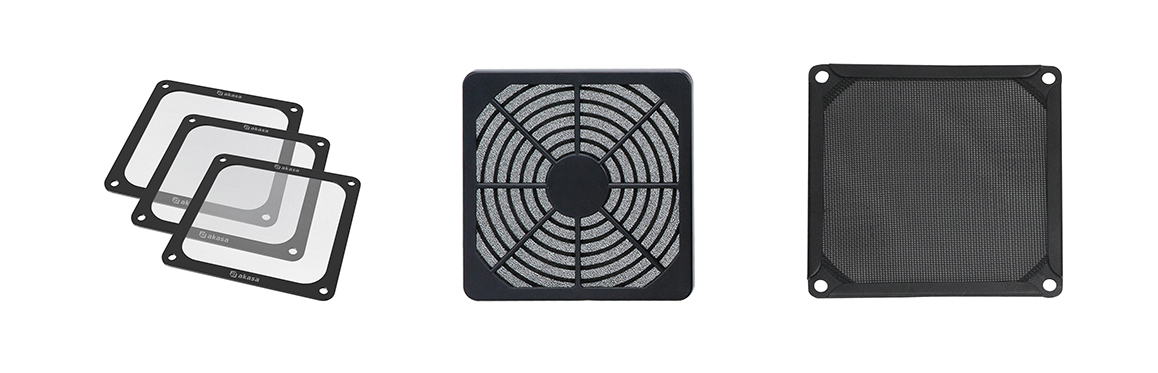
Dust can be considered a hidden performance killer. A large build-up of dust can clog vents, slow fans down, preventing them from operating at peak performance, and trap heat within your case. Installing fan filters can help keep dust and debris out while maintaining airflow. They’re easy to clean and help extend the lifespan of your PC components, keeping your system running smoothly and efficiently.
We offer a range of air filters in varying sizes (40mm – 120mm), as well as fan filters that use thin and lightweight fine mesh. For easy installation and cleaning, magnetic versions are also available.
Build Smart, Stay Cool
Effective cooling starts with thoughtful planning. By understanding airflow, selecting quality fans, using the right thermal interface materials and keeping dust in check, you’ll be able to ensure stable temperatures and reliable performance across all your build’s components. A well-cooled PC performs efficiently, runs quietly and maintains consistent performance over time.
Whether you are building your first system or upgrading an existing one, Akasa offers a complete range of thermal solutions, including fans, coolers and thermal accessories designed to keep your system running at its best.
About Akasa
Akasa is a global computer hardware and electronics manufacturer which fuses innovative design with cutting-edge technology and engineering to deliver exceptional products for our customers. Founded in 1997, Akasa has extensive expertise to provide quality solutions to suit your needs. We offer passive and active case solutions, coolers, heatsinks, fans, PC lighting and a vast array of card readers, cables, and adapters.
Legal Notices
© Copyright 2025 Akasa. All rights reserved. Akasa is a trading style of the Akasa group of companies. This article is intended for general informational purposes only and does not constitute professional or technical advice. Product performance may vary depending on system configuration, environment, and usage. Always refer to official installation manuals for guidance. Product features, specifications, and availability are subject to change without notice.
Intel, the Intel logo, and related marks are trademarks of Intel Corporation. AMD, the AMD logo, and related marks are trademarks of Advanced Micro Devices, Inc. All other company names, logos, product names, and brands are the property of their respective owners. Use of third-party names does not imply affiliation or endorsement.


